



13 Best Freelancing Skills for a Low-End Laptop
You Don’t Need an Expensive Laptop to Start Freelancing You open your laptop, wait for Windows to finish loading, and carefully launch one browser tab at a time. The fan starts making noise. The…

Key takeaways
Start with the most useful points from this guide.
You Don’t Need an Expensive Laptop to Start Freelancing
You open your laptop, wait for Windows to finish loading, and carefully launch one browser tab at a time.
The fan starts making noise. The cursor freezes for a second. You avoid opening another application because you already know what will happen.
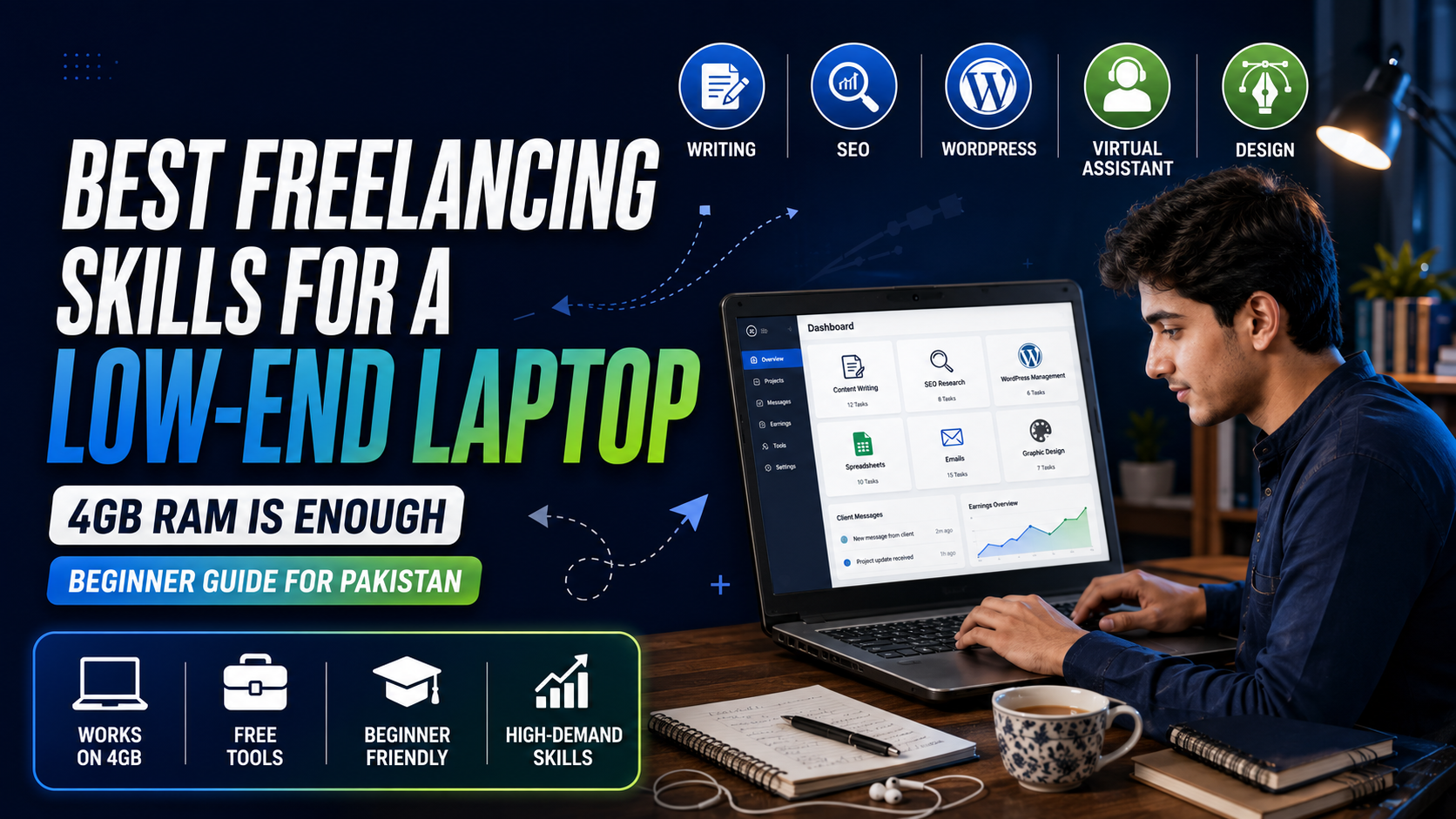
At that moment, freelancing can feel like something meant only for people with expensive MacBooks, powerful gaming computers, and fast internet connections. However, choosing the best freelancing skills for a low-end laptop can help you start working online without upgrading your computer immediately.
You do not need a high-end laptop for every freelancing skill. Many clients pay for clear writing, accurate research, reliable communication, organized spreadsheets, and properly managed websites—not for the specifications of the computer used to complete the work.
A laptop with 4GB RAM will struggle with advanced video editing, 3D rendering, and modern game development. However, it can still handle several practical online services when used carefully.
The real challenge is choosing the right skill.
This guide covers the best freelancing skills for a low-end laptop, the free tools you can use, the services you can offer, and the demanding skills you should avoid until you upgrade your computer.
Can You Freelance With a Low-End Laptop?
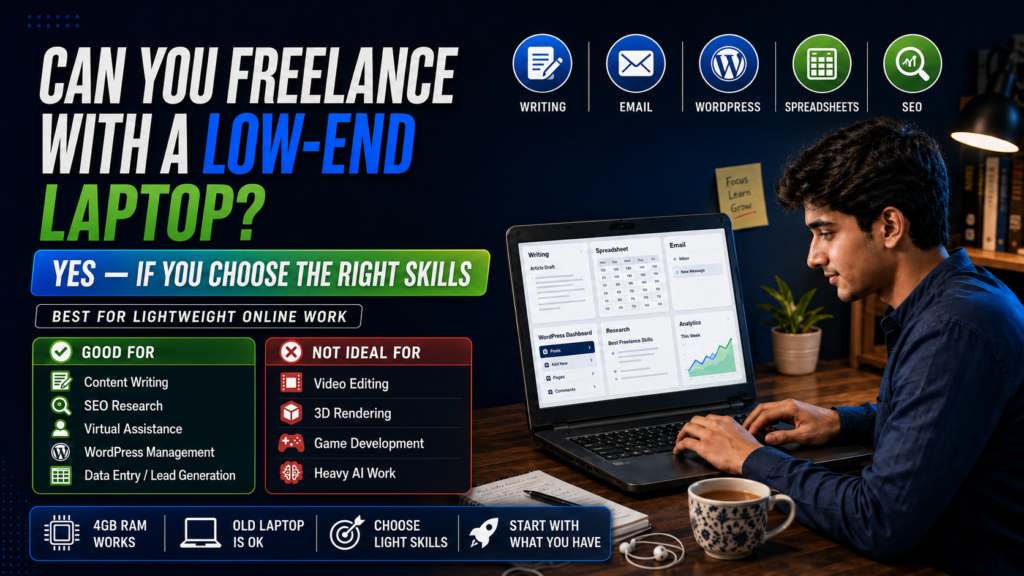
Yes, you can freelance with a low-end laptop, but you need to work within its limits.
A 4GB RAM laptop is suitable for tasks that mainly involve:
- Writing and editing text
- Browsing websites
- Updating spreadsheets
- Sending emails
- Managing online accounts
- Editing simple graphics
- Working inside WordPress
- Communicating with clients
Pakistani beginners can also explore free online training through the DigiSkills Training Program, which offers courses related to freelancing and digital skills.
It is less suitable for tasks that require:
- Processing large video files
- Rendering complex animations
- Running several professional applications together
- Compiling large software projects
- Training artificial-intelligence models locally
- Working with complex 3D scenes
The important difference is between learning a skill and running demanding software.
You can learn marketing, writing, SEO, customer service, lead generation and website management without owning an expensive computer. In these fields, your thinking, communication and attention to detail matter more than your graphics card.
Pakistan’s government-backed DigiSkills programme currently offers free courses in areas including freelancing, SEO, WordPress and virtual assistance, all of which are practical options for basic computers.
Your old laptop may slow you down occasionally, but it does not automatically disqualify you from earning online.
Minimum Laptop Specifications Required for Freelancing
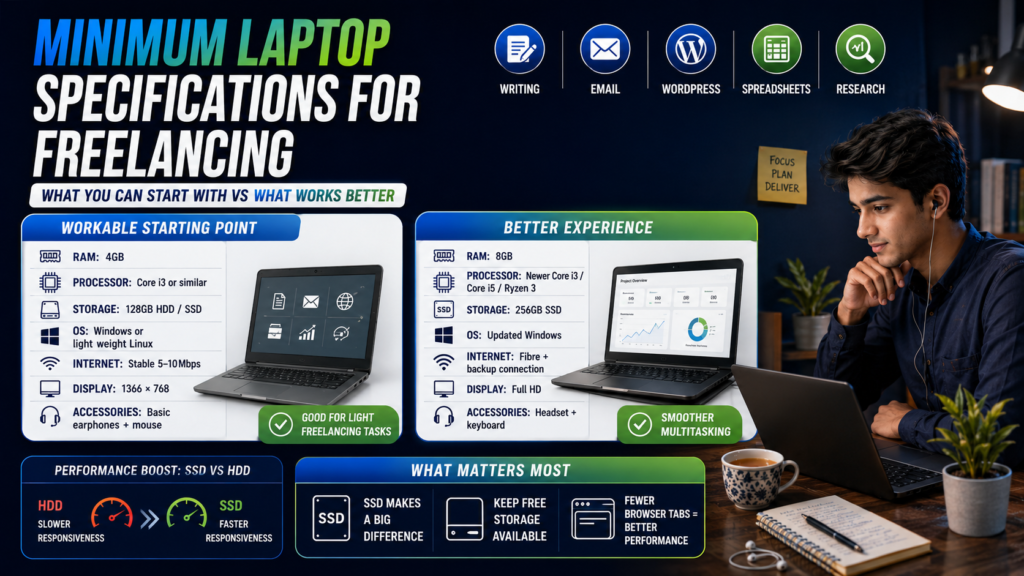
There is no single minimum specification for every freelancer because content writing and video editing are completely different workloads.
For the skills discussed in this guide, the following setup is workable:
| Component | Workable starting point | Better experience |
|---|---|---|
| RAM | 4GB | 8GB |
| Processor | Intel Core i3 or similar dual-core processor | Newer Core i3, Core i5 or Ryzen 3 |
| Storage | 128GB HDD or SSD | 256GB SSD |
| Operating system | Supported Windows or lightweight Linux distribution | Updated Windows with unnecessary apps removed |
| Internet | Stable 5–10 Mbps connection | Fibre connection with mobile-data backup |
| Display | 1366 × 768 | Full HD display |
| Accessories | Basic earphones and mouse | Headset with microphone and external keyboard |
A few points matter more than they first appear.
An SSD can make a bigger difference than expected
If your laptop still uses an old mechanical hard drive, replacing it with a basic SSD can improve startup time, application loading and general responsiveness.
It will not turn a weak processor into a powerful one, but it can make the computer feel much less frustrating.
Keep free storage available
Do not fill the entire drive with movies, downloads and duplicate files. Keep enough free space for Windows updates, browser cache and temporary files.
Four browser tabs are better than forty
Browsers can consume a large amount of memory. On a 4GB RAM laptop, opening many tabs while running WhatsApp, Zoom, Canva and Microsoft Word at the same time will cause problems.
Use bookmarks, close completed tabs and work on one part of the project at a time.
Use offline tools when possible
Google allows Docs, Sheets and Slides files to be made available offline through Chrome or Microsoft Edge. This can be useful during unstable internet connections, provided offline access is configured in advance.
LibreOffice is another useful option for writing and spreadsheet work. Its official Windows requirements are very light compared with many modern creative applications.
Google also allows selected Docs, Sheets and Slides files to be made available offline. This can be useful for freelancers dealing with unstable internet connections, although offline access must be configured in advance. Follow Google’s guide to using Google Docs offline before relying on it for client work.
For offline writing and spreadsheet work, LibreOffice system requirements are relatively modest compared with many modern creative applications. Check the currently supported operating systems before installing it on an older laptop.
Best Freelancing Skills for a 4GB RAM Laptop: Quick Comparison
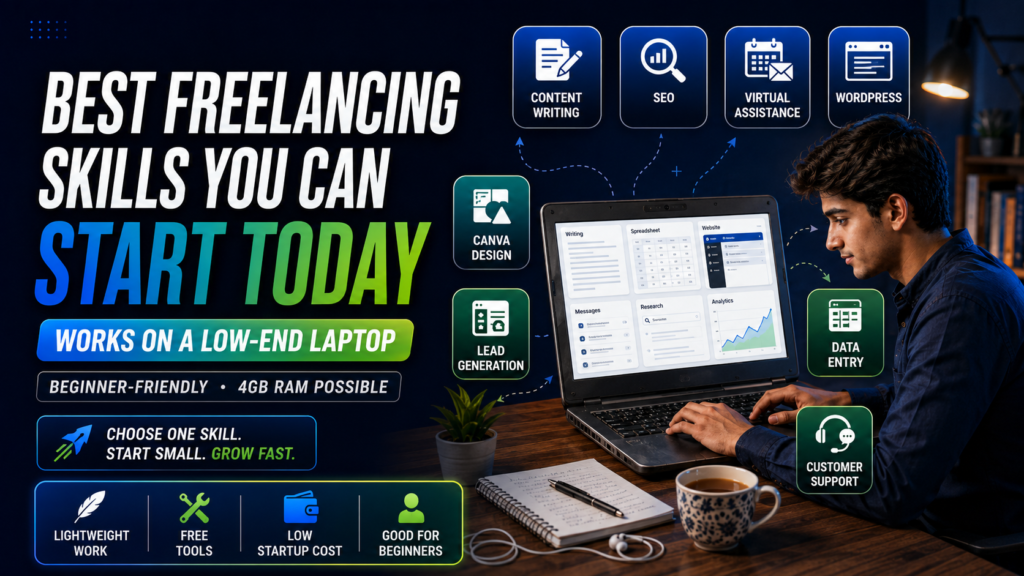
Income potential in this table is relative. It does not represent guaranteed earnings. Your results will depend on your ability, portfolio, niche, communication and client-acquisition efforts.
| Skill | Works on 4GB RAM? | Free tools | Learning difficulty | Income potential |
|---|---|---|---|---|
| Content writing | Yes | Google Docs, LibreOffice Writer, LanguageTool | Medium | Medium to high |
| Proofreading and editing | Yes | Google Docs, LanguageTool, Hemingway Editor | Medium | Medium |
| SEO and keyword research | Yes, with limited tabs | Google Search Console, Google Trends, Keyword Planner | Medium | High |
| Virtual assistance | Yes | Gmail, Google Calendar, Docs, Sheets | Low to medium | Medium |
| WordPress website management | Yes | WordPress, Photopea, Google Docs | Medium | High |
| Social-media management | Yes | Meta Business Suite, Buffer, Canva | Medium | Medium to high |
| Canva graphic design | Yes, for simple designs | Canva, Photopea, TinyPNG | Medium | Medium |
| Lead generation | Yes | Google Sheets, LinkedIn, company websites | Low to medium | Medium |
| Email marketing | Yes | Mailchimp, Brevo, Google Sheets | Medium | High |
| Data entry and web research | Yes | Google Sheets, LibreOffice Calc | Low | Low to medium |
| Translation and transcription | Yes | Google Docs, Audacity, oTranscribe | Medium | Medium |
| Online tutoring | Usually | Google Meet, Zoom, Whiteboard tools | Medium | Medium to high |
| Customer-support services | Yes | Gmail, Slack web, Help Scout documentation | Medium | Medium |
Now let us look at each option properly.
1. Content Writing
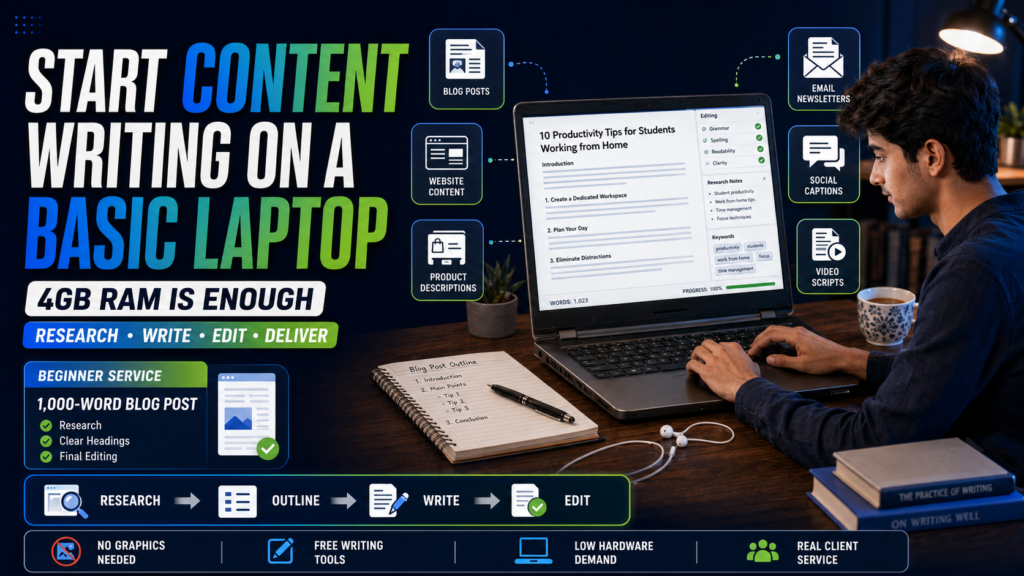
Content writing is one of the most practical freelancing skills for a 4GB RAM laptop because the work is mostly text-based.
You do not need Photoshop, Premiere Pro or a dedicated graphics card. A browser and a document editor are enough for most projects.
Businesses hire freelance writers for:
- Blog posts
- Website pages
- Product descriptions
- Email newsletters
- Social-media captions
- Case studies
- Comparison articles
- How-to guides
- Frequently asked questions
- YouTube video scripts
However, content writing is not simply typing whatever comes to mind.
Good writers understand the reader’s problem, research the subject, organize information and explain it clearly. They also adjust their writing according to the client’s tone.
A medical website may require a careful and professional style. A gaming website may prefer something energetic and conversational. A local service business may need short, direct language that leads readers toward booking an appointment.
What can a beginner offer?
Start with a narrow service instead of advertising yourself as a writer for every industry.
For example:
- 1,000-word blog posts for small business websites
- Product descriptions for Pakistani online stores
- Website content for local service providers
- Simple technology guides for beginners
- SEO blog writing for home, education or career websites
Choosing a clear niche makes it easier to create portfolio samples and explain your service.
Free tools
- Google Docs
- LibreOffice Writer
- LanguageTool
- Hemingway Editor
- Google Search
- Google Trends
Laptop warning
Research can become slow when you open too many websites. Keep your main writing document open and research one section at a time.
Save useful information in notes, close the source tab and then continue writing.
First portfolio project
Write a complete article answering a real question in your chosen niche. Include a strong introduction, useful headings, examples, a conclusion and a short meta description.
Do not wait for a client before producing your first sample.
2. Proofreading and Editing
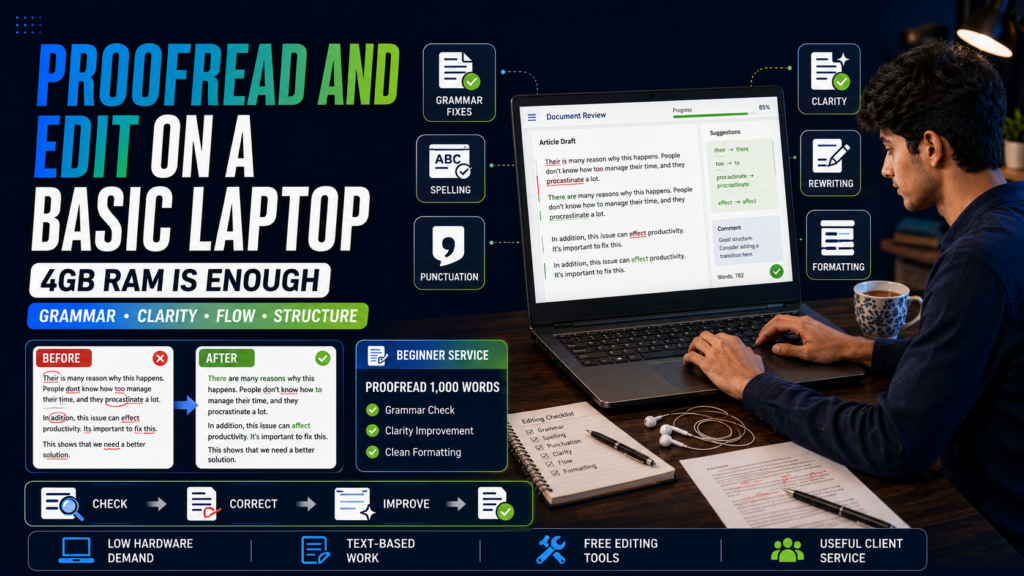
Not everyone wants to write an article from the beginning.
Some clients already have content but need someone to improve its grammar, clarity, flow and structure. This creates an opportunity for proofreaders and editors.
Proofreading generally focuses on:
- Spelling
- Grammar
- Punctuation
- Capitalization
- Formatting
- Typing mistakes
- Repeated words
Editing goes deeper. It may involve:
- Rewriting unclear sentences
- Improving paragraph order
- Removing unnecessary information
- Making the tone more natural
- Simplifying difficult language
- Checking consistency
- Improving headings and transitions
This skill is especially useful for people with strong English or Urdu language ability.
You may work with bloggers, students, small businesses, self-published authors or professionals preparing reports.
Beginner services you can offer
- Proofread up to 1,000 words
- Improve website copy
- Edit blog posts
- Correct product descriptions
- Rewrite awkward business emails
- Format documents consistently
- Edit personal statements or cover letters
Be careful with academic work. Editing someone’s language is different from secretly completing an assessed assignment on their behalf.
Free tools
- Google Docs suggestion mode
- LibreOffice Writer
- LanguageTool
- Hemingway Editor
- Standard dictionaries
First portfolio project
Take an old, poorly written paragraph and create a before-and-after editing sample.
Explain what you changed and why. This demonstrates judgment rather than simply showing that you know how to use a grammar checker.
3. SEO and Keyword Research
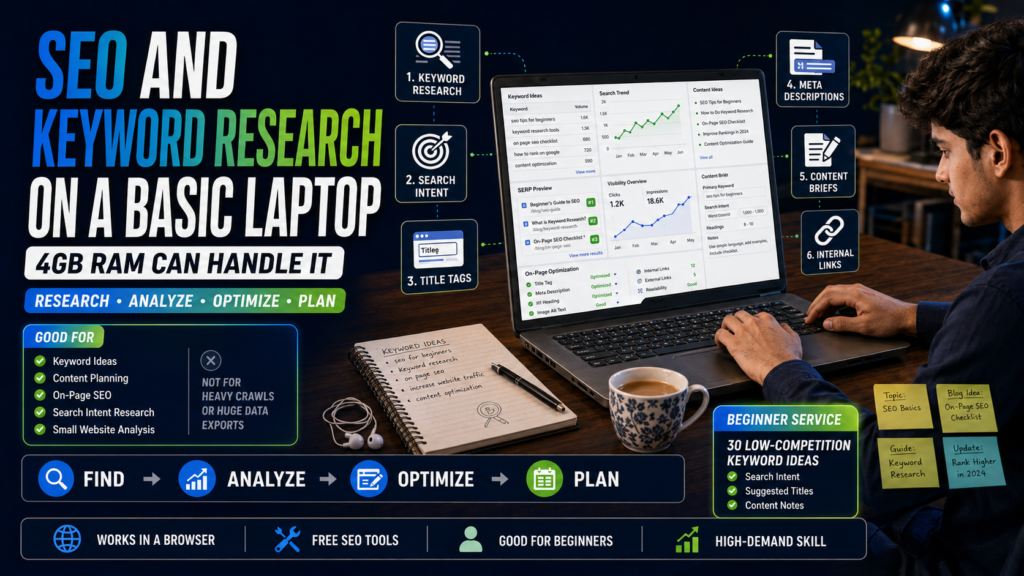
Search-engine optimization helps websites improve their visibility in search results.
It sounds highly technical, but many beginner SEO services can be completed through a browser on an old laptop.
Possible services include:
- Finding relevant keywords
- Reviewing title tags
- Writing meta descriptions
- Organizing headings
- Improving internal links
- Updating old articles
- Checking search intent
- Creating content briefs
- Reviewing competitor content
- Monitoring basic Search Console data
- Optimizing image names and alternative text
The laptop becomes a limitation when you try to run several large SEO platforms, crawl thousands of pages or export huge datasets.
For small websites, however, much of the work can be done manually with free tools.
Free SEO tools
- Google Search
- Google Trends
- Google Keyword Planner
- Google Search Console
- Bing Webmaster Tools
- Ahrefs Webmaster Tools for eligible verified sites
- Keyword Surfer
- Detailed SEO Extension
- Google Sheets
Google’s official Keyword Planner guide explains how the tool can be used to discover related keyword ideas and view estimated monthly search activity. Remember that these figures are estimates and do not guarantee traffic or rankings.
Website owners can also use the Google Search Console Performance report to view the queries that generate impressions and clicks, identify successful pages and find content that may need improvement.
A practical beginner offer
Instead of selling “complete SEO,” offer something specific:
I will research 30 low-competition blog topics for your website and organize them by search intent.
That service is easier to understand, deliver and demonstrate.
You can create another package for:
I will optimize the title, headings, meta description and internal links of five existing blog posts.
First portfolio project
Choose a small website and prepare a sample SEO report containing:
- Five keyword ideas
- Search intent for each keyword
- Suggested article titles
- Missing topics
- Improved title tags
- Internal-link opportunities
Do not claim that your recommendations will guarantee first-page rankings. SEO results depend on competition, site quality, authority, content and many other factors.
4. Virtual Assistance
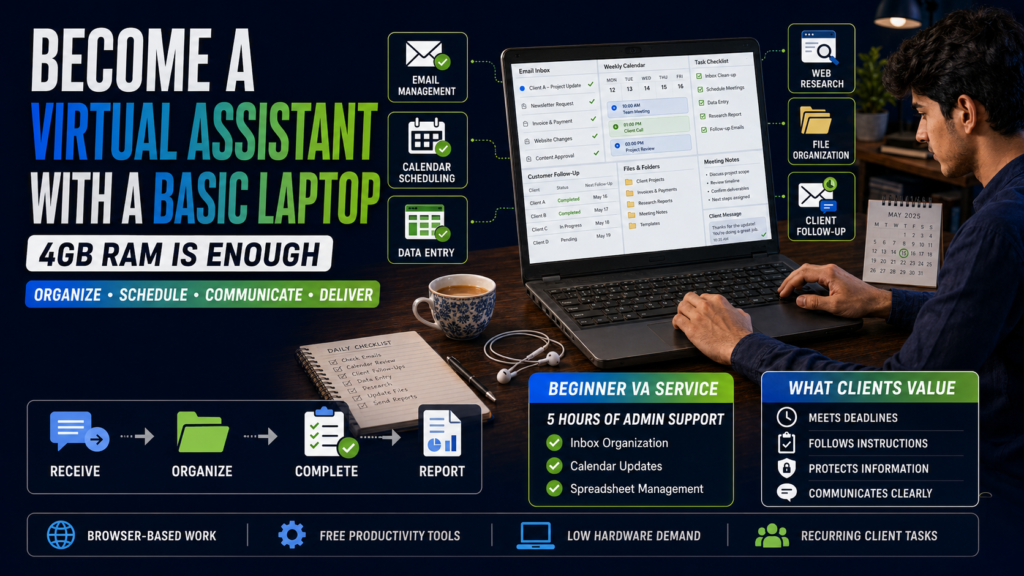
A virtual assistant helps a client complete administrative and recurring online tasks.
The work can be simple, but clients value reliability. A virtual assistant who follows instructions, meets deadlines and communicates clearly can become more useful than someone with advanced skills but poor work habits.
Common virtual-assistance tasks include:
- Organizing emails
- Scheduling appointments
- Updating spreadsheets
- Preparing documents
- Uploading files
- Managing online forms
- Entering customer information
- Formatting reports
- Conducting simple research
- Following up with leads
- Organizing folders
- Preparing meeting notes
Most of this work can be performed on a basic laptop.
Free tools
- Gmail
- Google Calendar
- Google Drive
- Google Docs
- Google Sheets
- Trello
- Notion web version
- Clockify
Avoid installing every productivity application on your laptop. Use browser versions when possible and close tools you are not actively using.
Skills clients expect
Virtual assistance is not only about knowing how to use Gmail.
Clients may expect you to:
- Protect confidential information
- Ask clear questions
- Follow written procedures
- Name files properly
- Double-check your work
- Report problems early
- Respect different time zones
- Record completed tasks
First portfolio project
Create a sample administrative system for an imaginary business:
- An organized Google Drive folder structure
- A weekly task tracker
- A customer follow-up spreadsheet
- Three professional email templates
- A simple appointment calendar
This shows clients how you think and organize information.
5. WordPress Website Management
WordPress website management is different from advanced web development.
You do not need to build complicated plugins or write thousands of lines of code to start. Many website owners simply need a responsible person to handle regular updates.
WordPress mainly runs on the website’s hosting server rather than on the freelancer’s computer. Its official WordPress hosting requirements focus on the server’s PHP version, database software and HTTPS support. This is one reason basic WordPress publishing and administration can be possible through a browser on modest hardware.
Beginner WordPress services can include:
- Uploading and formatting blog posts
- Adding headings and lists
- Compressing and inserting images
- Updating menus
- Creating categories and tags
- Fixing broken links
- Updating text
- Adding internal links
- Scheduling articles
- Moderating comments
- Updating plugins carefully
- Creating backups through the host
- Performing basic page edits
- Checking forms
WordPress itself runs on the website’s hosting server. Your laptop mainly handles the browser and the administration dashboard, which makes basic website management possible on modest hardware. WordPress’s main technical server requirements concern the host’s PHP, database and HTTPS support rather than a powerful client computer.
Where a 4GB laptop may struggle
Large visual page builders can consume significant browser memory, especially when editing pages containing animations, videos and many sections.
You can still manage simpler websites, but avoid opening the page builder, Canva, several image websites and multiple WordPress tabs together.
Free tools
- WordPress
- Google Docs
- TinyPNG
- Squoosh
- Photopea
- Broken Link Checker browser tools
- Google PageSpeed Insights
A strong beginner package
I will upload and format four WordPress blog posts, add images, headings, categories, tags, meta descriptions and internal links.
This is more specific and believable than claiming to be a complete WordPress expert after watching a few tutorials.
First portfolio project
Create a free test website or local practice site and publish three properly formatted articles.
Show:
- Clean headings
- Compressed images
- Categories
- Internal links
- A readable mobile layout
- Consistent formatting
6. Social-Media Management
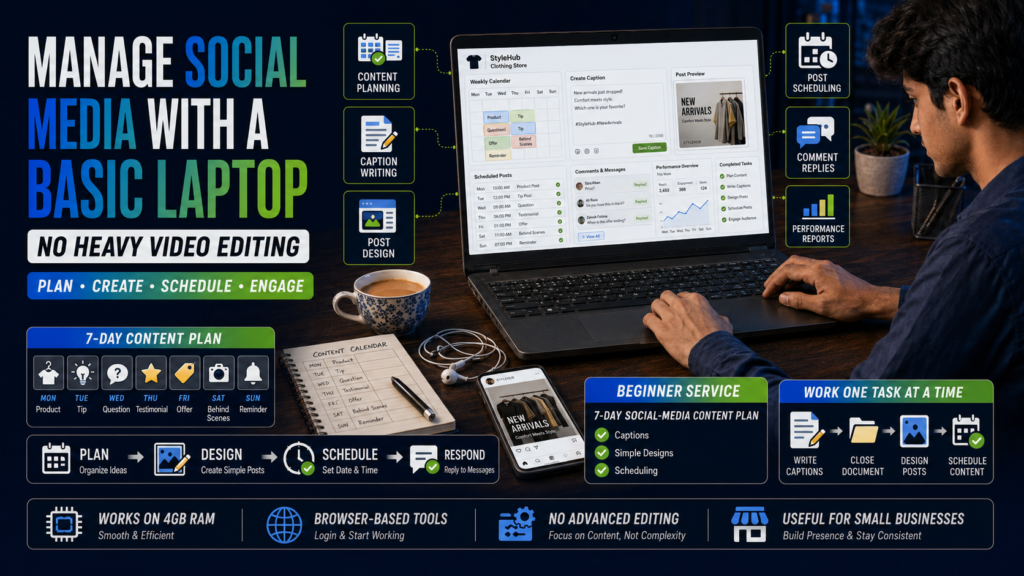
Social-media management does not always mean creating viral videos or running massive advertising campaigns.
Small businesses often need help with basic, consistent account management.
A beginner can assist with:
- Creating content calendars
- Writing captions
- Scheduling posts
- Replying to basic comments
- Organizing content ideas
- Researching competitors
- Creating simple Canva posts
- Preparing hashtag groups
- Repurposing blog content
- Recording monthly performance
- Updating profile information
This can work on a low-end laptop, especially when you use official scheduling tools and avoid complex video editing.
Free tools
- Meta Business Suite
- Canva
- Google Sheets
- Buffer’s available free features
- Pinterest scheduling tools
- Native platform analytics
Choose a business type
Do not create a generic portfolio containing random motivational quotes.
Pick one business type, such as:
- Restaurant
- Clothing store
- Beauty salon
- Tuition academy
- Real-estate agent
- Dentist
- Travel company
Then create a realistic seven-day content plan for that business.
Laptop warning
Canva, Meta Business Suite and several social platforms can use considerable browser memory when opened together.
Prepare captions in Google Docs first. Open Canva only when designing, export the files, close it and then schedule the content.
This one-task-at-a-time method can prevent many slowdowns.
7. Canva Graphic Design
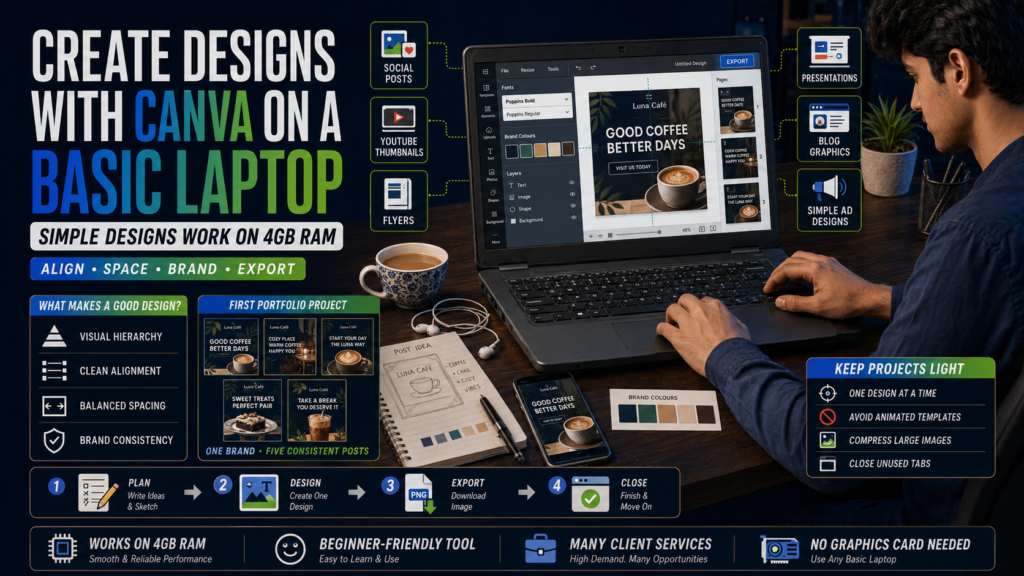
Canva has made simple graphic-design work more accessible to beginners.
You can use it to create:
- Social-media posts
- Facebook covers
- YouTube thumbnails
- Flyers
- Menus
- Presentations
- Advertisements
- Simple infographics
- Blog featured images
- CV designs
- Certificates
- Event invitations
Canva can run in a browser, but that does not mean every Canva project will run smoothly on 4GB RAM.
A small social-media post with a few elements is manageable. A 50-page presentation containing videos, animations and dozens of high-resolution images may become slow.
How to use Canva on a weak laptop
- Work on one design at a time.
- Avoid animated templates.
- Compress large uploads.
- Close unused browser tabs.
- Remove unnecessary elements.
- Export finished pages before creating more.
- Use simple fonts and layouts.
- Avoid keeping several projects open.
Do not sell templates with no design thinking
Clients are not paying you merely to replace text in the first template you find.
Learn:
- Visual hierarchy
- Alignment
- Spacing
- Contrast
- Font pairing
- Brand consistency
- Image selection
- Correct export sizes
Free tools
- Canva
- Photopea
- TinyPNG
- Squoosh
- Pexels
- Unsplash
- Google Fonts
Check the licence and usage conditions of any image, icon, font or template before using it commercially.
First portfolio project
Create a five-post social-media set for one fictional brand. Keep the same colours, fonts and visual style across all posts.
A coordinated set looks much more professional than five unrelated designs.
8. Lead Generation
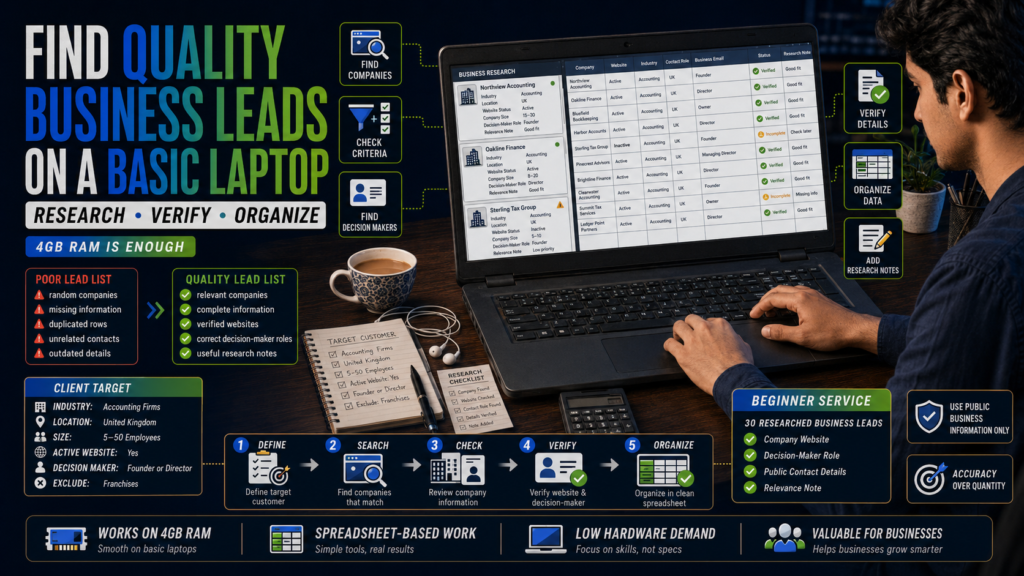
Lead generation involves finding potential customers for a business.
For example, a web-design agency may ask you to find restaurants that have outdated websites. A software company may need contact information for human-resources managers. A marketing agency may want a list of local dental clinics.
Your job may involve collecting:
- Company name
- Website
- Industry
- Location
- Contact person
- Public business email
- LinkedIn profile
- Phone number
- A relevant note about the company
This is one of the best skills for a basic laptop because the final deliverable is usually a spreadsheet.
What separates good and bad lead generation?
A poor lead list contains random companies, outdated details and unrelated contacts.
A useful lead list matches the client’s instructions.
For example, the client may want:
- UK accounting firms
- Between 5 and 50 employees
- Offering services to small businesses
- With an active website
- Excluding franchises
- Including a decision-maker’s name
Following those conditions carefully is more valuable than collecting thousands of unverified entries.
Free tools
- Google Search
- Google Maps
- Company websites
- Google Sheets
- LibreOffice Calc
- Hunter’s limited free features
- Email-verification tools with free limits
Use only publicly available business information and respect relevant privacy, platform and anti-spam rules.
First portfolio project
Build a sample list of 30 businesses in one industry. Add a column explaining why each company fits the target criteria.
That extra column shows that you researched the leads instead of copying them blindly.
9. Email Marketing
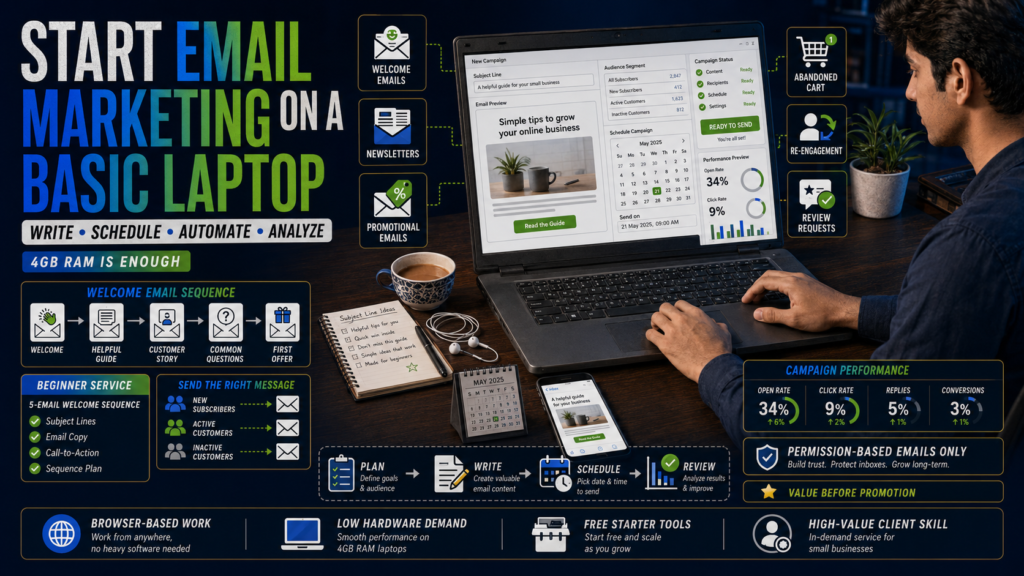
Email marketing is not just sending a message to thousands of people.
Businesses use email to:
- Welcome new subscribers
- Announce products
- Promote offers
- Share educational content
- Recover abandoned carts
- Remind customers about events
- Re-engage inactive subscribers
- Send newsletters
- Request reviews
- Deliver downloadable resources
A freelancer may help write emails, build campaigns, clean contact lists, segment subscribers, create basic automations and prepare reports.
Most email-marketing platforms work through a browser, so the laptop requirements are modest.
Mailchimp continues to provide a basic free marketing option intended for beginners testing some of its tools, although plan limits and features can change. Always check current pricing before promising a specific platform allowance to a client.
Email-marketing plans, contact allowances and sending limits can change over time. Check the current Mailchimp pricing plans before choosing a platform or promising specific features to a client.
Free tools
- Mailchimp
- Brevo
- Google Docs
- Google Sheets
- Canva for simple email graphics
- Subject-line testing tools
Start with email copy
Learning every automation feature at once can be overwhelming.
Begin by writing:
- A welcome email
- A promotional email
- An abandoned-cart reminder
- A weekly newsletter
- A re-engagement email
Then learn how campaigns are created inside one platform.
First portfolio project
Create a five-email welcome sequence for an imaginary online store:
- Welcome and brand introduction
- Helpful product-selection guide
- Customer story or testimonial
- Common questions
- First-purchase offer
Explain the purpose of each email.
10. Data Entry and Web Research
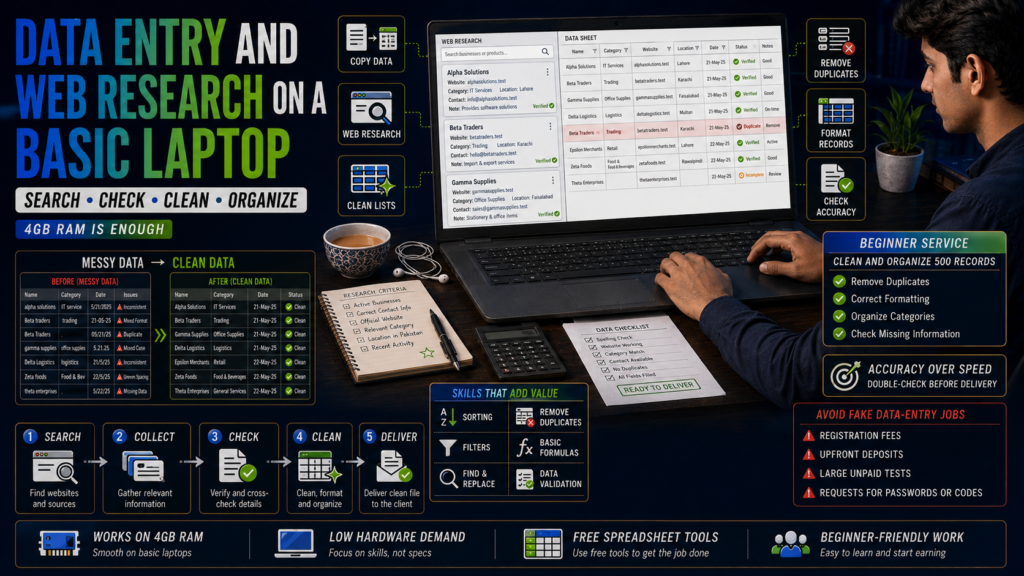
Data entry is often presented as the easiest online skill. Technically, it is easy to understand, but finding good clients can be difficult because competition is high.
Typical work includes:
- Copying information into spreadsheets
- Cleaning lists
- Formatting documents
- Converting tables
- Updating product information
- Organizing survey results
- Entering invoice details
- Removing duplicates
- Finding missing information
- Categorizing records
The computer requirements are low, but accuracy is extremely important.
A single misplaced number can create problems for the client.
Free tools
- Google Sheets
- LibreOffice Calc
- Google Docs
- PDF readers
- Basic text editors
Learn useful spreadsheet functions
To move beyond basic copying, learn:
- Sorting
- Filters
- Find and replace
- Removing duplicates
- Text-to-columns
- Basic formulas
- Conditional formatting
- Data validation
- Consistent date formats
These abilities allow you to offer data cleaning and organization rather than competing only for low-priced typing jobs.
Be careful with fake jobs
Avoid opportunities that ask you to:
- Pay a registration fee
- Buy a compulsory package
- Deposit money before receiving work
- Move communication to suspicious accounts immediately
- Share banking passwords or verification codes
- Receive and transfer unexplained funds
- Complete an enormous unpaid “test”
Legitimate clients may request a small sample, but they should not ask you to complete the entire project for free.
First portfolio project
Create a messy spreadsheet, then produce a cleaned version with:
- Standardized names
- Correct date formats
- Removed duplicates
- Consistent categories
- Filters
- A summary sheet
11. Translation and Transcription
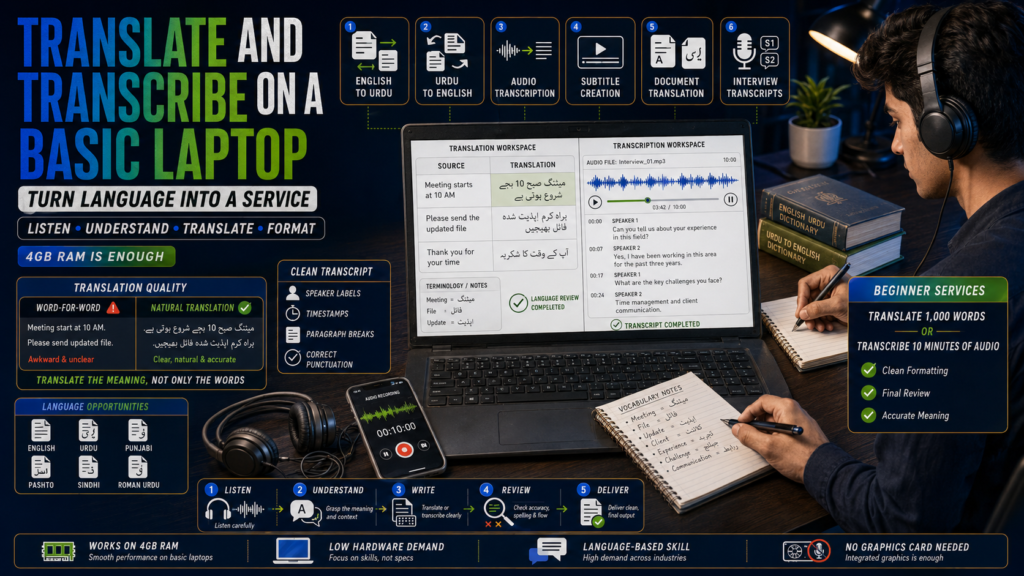
Translation is suitable for people who can understand two languages well and express meaning naturally in both.
Pakistani freelancers may offer services involving:
- English to Urdu translation
- Urdu to English translation
- Punjabi translation
- Pashto translation
- Sindhi translation
- Roman Urdu conversion
- Subtitle translation
- Website localization
- Document translation
Translation is not replacing every word with its dictionary equivalent. The final text should preserve the original meaning while sounding natural to the intended reader.
Transcription involves listening to audio and converting speech into written text.
Possible projects include:
- Interviews
- Lectures
- Podcasts
- Meetings
- YouTube videos
- Research recordings
- Voice notes
Does transcription work on 4GB RAM?
Basic audio transcription can work well. Keep the audio file small and avoid heavy professional audio-processing projects.
Audacity is designed for audio recording and editing and has historically been able to operate on modest systems, although performance depends on project size and current software compatibility.
Free tools
- Google Docs
- LibreOffice Writer
- Audacity
- oTranscribe
- VLC Media Player
- Subtitle Edit
- Online dictionaries
First portfolio project
Transcribe a three-minute public-domain or self-recorded audio clip.
Create:
- A clean verbatim version
- A polished version with filler words removed
- Speaker labels
- Timestamps
- Correct paragraph breaks
For translation, prepare a short English-to-Urdu sample and explain any wording decisions that could not be translated literally.
12. Online Tutoring
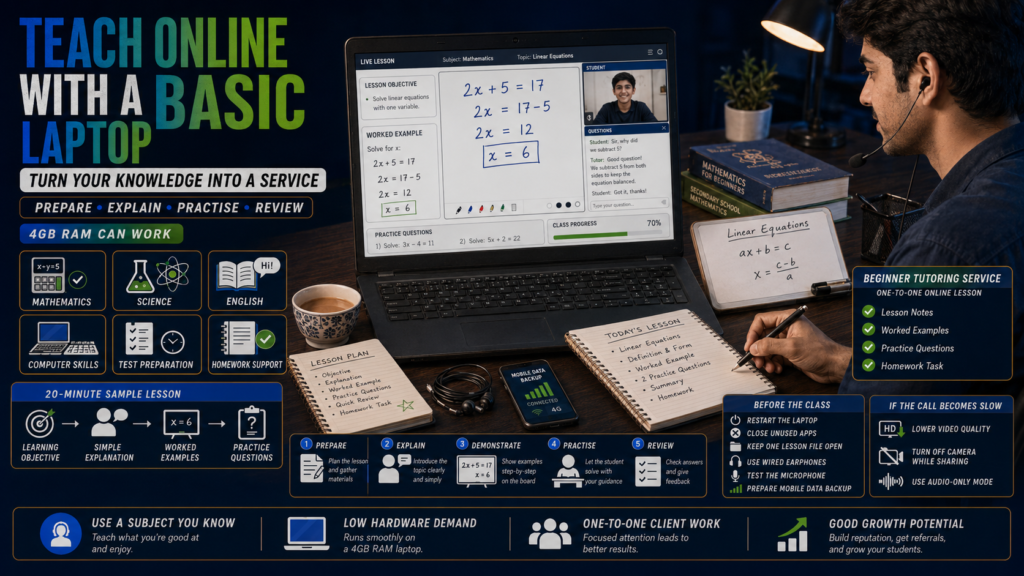
A low-end laptop can also be used to teach a subject you already understand.
Possible tutoring areas include:
- School mathematics
- Chemistry
- Physics
- Biology
- English grammar
- Spoken Urdu
- Quran recitation
- Basic computer skills
- Microsoft Office
- Entry-test preparation
- Homework support
The main difficulty is not preparing lessons. It is maintaining a stable video call while sharing your screen.
On a 4GB laptop, video-conferencing software may become slow if several other applications are running.
How to reduce problems
- Restart the laptop before the class.
- Close all unnecessary applications.
- Keep only the lesson file open.
- Use earphones to reduce echo.
- Lower the video resolution when needed.
- Turn off your camera during screen sharing if performance drops.
- Send lesson files before the call.
- Keep a mobile-data backup.
- Prepare an audio-only alternative.
Free tools
- Google Meet
- Zoom’s available free features
- Google Docs
- Google Slides
- Microsoft Whiteboard
- Online quiz tools
- WhatsApp for backup communication
First portfolio project
Prepare a 20-minute sample lesson containing:
- A clear learning objective
- A simple explanation
- Two worked examples
- Three practice questions
- A short homework activity
Record a short demonstration or teach someone you know and request honest feedback.
13. Customer-Support Services
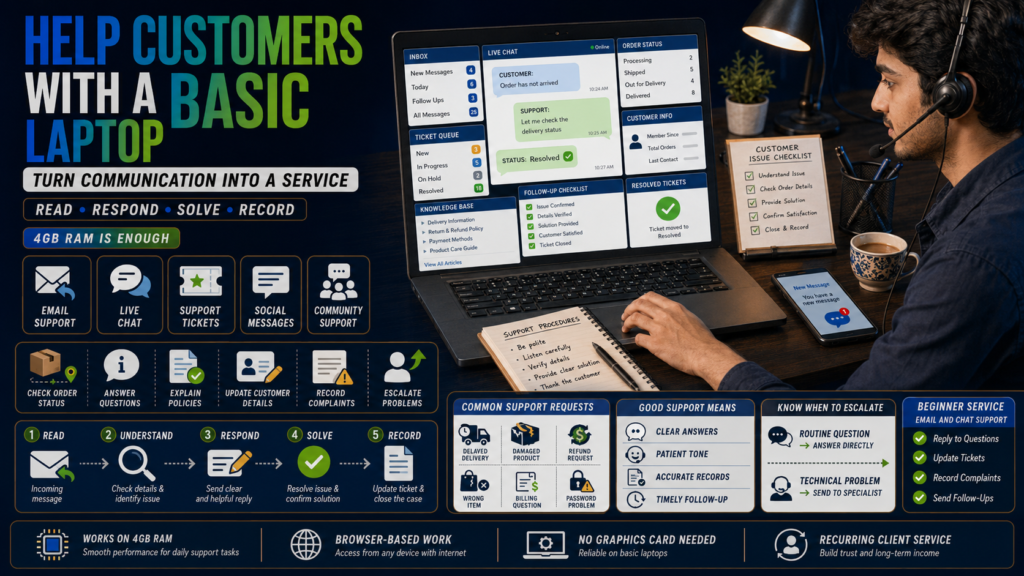
Customer-support freelancers help businesses respond to questions and solve routine problems.
Support may be provided through:
- Live chat
- Social-media messages
- Help-desk tickets
- Order-management systems
- Community forums
Common tasks include:
- Checking order status
- Explaining return policies
- Answering product questions
- Updating customer details
- Escalating technical problems
- Recording complaints
- Sending follow-up messages
- Organizing support tickets
A basic laptop can usually handle browser-based support tools, but this work requires more than fast typing.
Important customer-support skills
- Clear written communication
- Patience
- Careful reading
- Professional tone
- Problem solving
- Product knowledge
- Accurate record keeping
- Knowing when to escalate
- Staying calm with unhappy customers
Free practice tools
- Gmail
- Google Docs
- Google Sheets
- Slack web version
- Free knowledge-base examples
- Sample customer-support scenarios
First portfolio project
Create responses to ten realistic customer situations, such as:
- A delayed delivery
- A damaged product
- A refund request
- An incorrect item
- A forgotten password
- A billing question
- An angry complaint
- A request outside company policy
- A customer who provides incomplete information
- A technical problem that requires escalation
Make each answer polite, useful and concise.
Skills to Avoid on a Weak Laptop
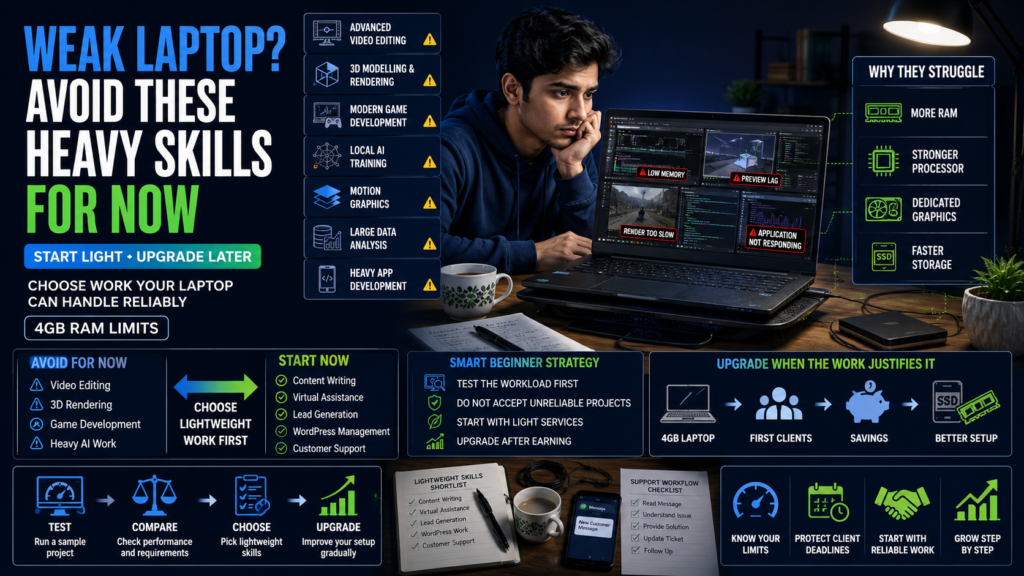
A 4GB laptop can help you begin freelancing, but pretending it has no limitations will only create frustration.
The following skills are better pursued after a hardware upgrade or through a carefully planned cloud-based workflow.
Advanced video editing
Simple trimming may be possible with lightweight software, but professional video editing involves large files, previews, effects, colour correction and exporting.
Adobe’s current Premiere technical requirements list 8GB RAM as the minimum, with more memory recommended for HD and 4K editing. This makes professional Premiere workflows unsuitable for a basic 4GB RAM laptop.
Current versions of Adobe Premiere list at least 8GB RAM for supported basic workflows, with higher memory recommended for reliable professional editing.
On a 4GB laptop, even a short high-resolution project can become slow and unstable.
3D modelling and rendering
Basic 3D learning may technically be possible on some older systems, but serious modelling, texturing, animation and rendering require more memory and graphics power.
Before attempting serious 3D work, check the latest Blender system requirements. Performance depends on the complexity of the scene, textures, lighting, rendering method and available graphics hardware—not simply whether the program can be installed.
Blender’s published requirements list 8GB RAM as a minimum baseline and considerably more for a stronger experience.
Modern game development
Small browser games or basic coding exercises are different from developing modern 3D games.
Epic Games currently recommends 32GB RAM and dedicated graphics memory for Unreal Engine development. Its official Unreal Engine hardware specifications demonstrate why modern 3D game development is not a practical starting service for a basic 4GB office laptop.
Unreal Engine’s current recommended hardware includes 32GB RAM and dedicated graphics memory, which is far beyond a typical 4GB office laptop.
Heavy local artificial-intelligence model training
Using browser-based online tools is different from training large models on your own computer.
Basic Python and machine-learning concepts can be studied without expensive hardware, but heavier local model training is different. The official PyTorch local installation guide explains the available CPU, CUDA and ROCm options and notes the benefits of compatible GPU hardware for accelerated workloads.
Local machine-learning training often benefits from a compatible dedicated GPU and substantial memory. PyTorch’s documentation points users toward CUDA or ROCm-capable hardware for GPU acceleration and also provides cloud options for workloads that need stronger infrastructure.
Complex motion graphics
Professional motion graphics can require large project files, several layers, effects, previews and long rendering times.
Professional motion-graphics software is even more demanding. Adobe’s current After Effects system requirements list 16GB RAM as the minimum, making it an unsuitable starting workload for most 4GB laptops.
A low-end laptop may open a basic project but struggle to provide a dependable client workflow.
Large-scale data analysis
Basic spreadsheets are fine. Working with millions of records, several large datasets, local databases or complex analytical software is a different matter.
Do not accept a project until you have tested a sample of the actual workload.
Heavy mobile-app development
Learning basic programming is possible on older hardware. Running a full development environment, emulator, browser, database and design tools at the same time may not be.
You can learn foundational coding now, but client-level application development may require an upgrade.
These are not skills you must avoid forever. They are simply poor starting choices when your current computer is already struggling with ordinary tasks.
Start with work your laptop can complete reliably. Upgrade after earning, not before proving that you can remain consistent.
Free Lightweight Tools for Each Freelancing Skill
| Skill | Recommended free tools | Best use |
|---|---|---|
| Content writing | Google Docs, LibreOffice Writer, LanguageTool | Writing and editing articles |
| Proofreading | Google Docs suggestion mode, LanguageTool, Hemingway Editor | Corrections and readability |
| SEO | Google Search Console, Google Trends, Keyword Planner | Keyword and website research |
| Virtual assistance | Gmail, Calendar, Drive, Sheets, Trello | Administration and organization |
| WordPress management | WordPress, TinyPNG, Squoosh, Photopea | Publishing and image preparation |
| Social-media management | Meta Business Suite, Canva, Google Sheets | Planning and scheduling |
| Graphic design | Canva, Photopea, Pexels, Google Fonts | Simple branded designs |
| Lead generation | Google Search, Maps, LinkedIn, Sheets | Finding and organizing prospects |
| Email marketing | Mailchimp, Brevo, Docs, Sheets | Campaigns and email copy |
| Data entry | Google Sheets, LibreOffice Calc | Data organization and cleaning |
| Translation | Docs, LibreOffice, dictionaries | Translation and document formatting |
| Transcription | Audacity, VLC, oTranscribe | Audio playback and transcription |
| Online tutoring | Google Meet, Slides, Whiteboard tools | Teaching and lesson delivery |
| Customer support | Gmail, Sheets, Slack web | Communication and record keeping |
Do not install every tool on this list.
Choose one skill, then install or bookmark only the tools required for that service.
How to Make a 4GB RAM Laptop Faster for Freelancing
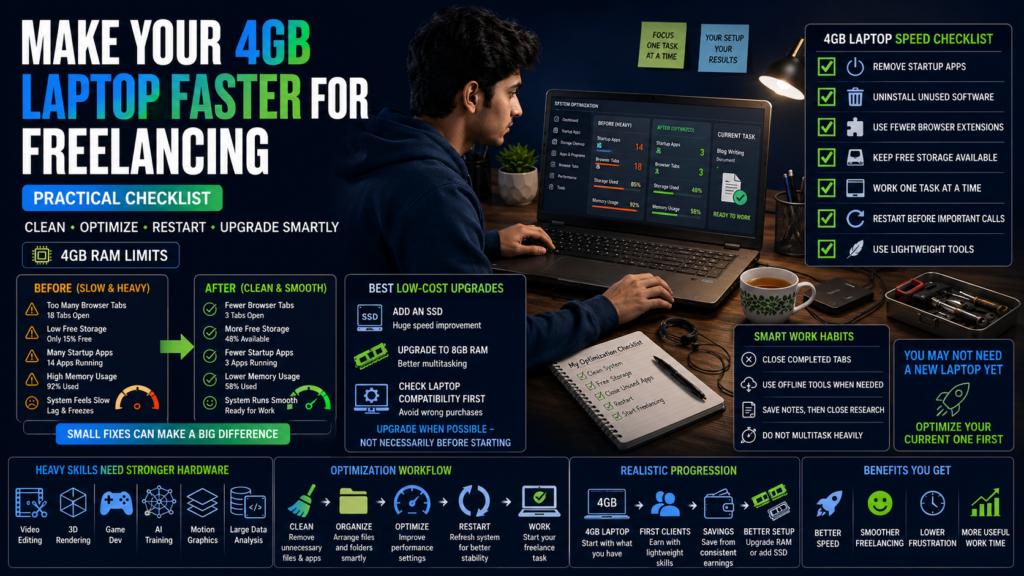
Before spending money on a new computer, improve the one you already have.
Remove unnecessary startup applications
Many applications automatically launch when Windows starts. Disable the ones you do not need.
Do not disable system, driver or security services unless you understand what they do.
Uninstall software you never use
Old games, duplicate media players, trial antivirus programs and unused editing applications can occupy storage and run background services.
Use fewer browser extensions
Every extension adds work to the browser. Keep only the extensions you actively use and trust.
Use a lightweight office suite
LibreOffice can be useful when browser-based document tools become slow or the internet is unavailable. Its published hardware requirements are low enough for many older systems.
Work sequentially
Do not research, write, design, attend a call and upload files at the same time.
A better process is:
- Complete the research.
- Save your notes.
- Close research tabs.
- Write the content.
- Close the document.
- Prepare the graphics.
- Upload the final files.
Restart before important calls
Restarting clears temporary memory usage and closes forgotten background processes.
Upgrade RAM when possible
Some laptops allow RAM upgrades while others have memory soldered to the motherboard.
Check the exact laptop model before buying anything.
Moving from 4GB to 8GB can noticeably improve browser multitasking, but compatibility should be confirmed first.
Consider an SSD
For many old laptops, installing an SSD is the most noticeable affordable upgrade for everyday responsiveness.
Which Freelancing Skill Should You Choose?
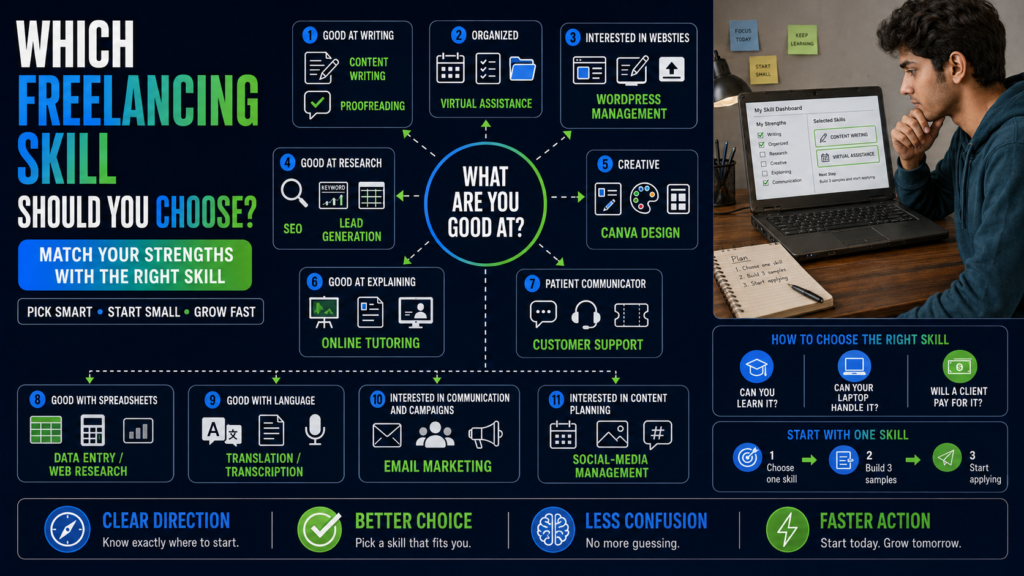
Do not choose a skill only because someone called it “high paying.”
A skill has value when three things meet:
- You can learn it.
- Your laptop can handle it.
- A client has a reason to pay for it.
Use the following guide.
Choose content writing or proofreading when:
- You enjoy reading.
- You can explain ideas clearly.
- Your grammar is reasonably strong.
- You are willing to research.
- You notice small mistakes.
Choose virtual assistance when:
- You are organized.
- You follow instructions carefully.
- You enjoy administrative work.
- You communicate professionally.
- You can handle repeated tasks without becoming careless.
Choose SEO when:
- You enjoy research.
- You like understanding why websites rank.
- You are comfortable with data and patterns.
- You can explain recommendations logically.
- You are prepared to keep learning.
Choose WordPress management when:
- You enjoy working with websites.
- You can learn technical steps patiently.
- You pay attention before changing settings.
- You understand the importance of backups.
- You like combining content, images and layout.
Choose Canva design when:
- You have a good visual sense.
- You enjoy arranging text and images.
- You notice spacing and alignment.
- You are willing to study design principles.
- You can accept and apply client feedback.
Choose lead generation when:
- You are good at online research.
- You can follow detailed conditions.
- You enjoy organized spreadsheet work.
- You can verify information.
- You are patient.
Choose online tutoring when:
- You already understand a subject well.
- You are comfortable explaining it.
- You can speak clearly.
- You are patient with beginners.
- Your internet connection can support calls.
Choose customer support when:
- You stay calm under pressure.
- You write clear messages.
- You can understand policies.
- You do not take customer frustration personally.
- You are willing to work according to another country’s time zone.
When you remain unsure, start with content writing, virtual assistance, lead generation or WordPress content management. These skills have clear beginner services and can be practised without powerful hardware.
A 30-Day Beginner Roadmap
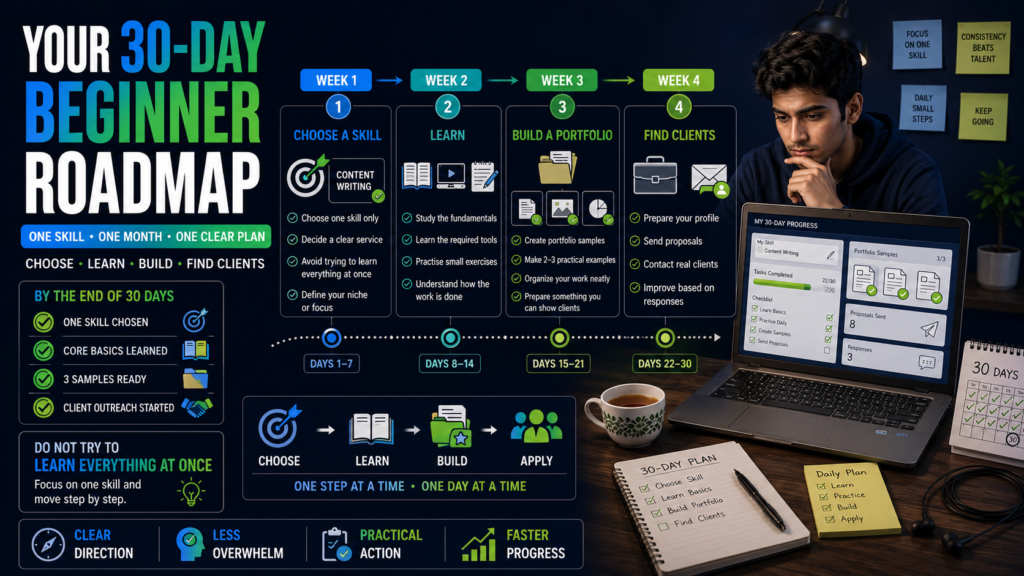
Trying to learn five skills at once is one of the fastest ways to make no progress.
For the next 30 days, choose one skill only.
Days 1–3: Choose a clear service
Research the skill and decide exactly what you want to offer.
Do not write:
I provide digital marketing, SEO, graphic design, writing, development, data entry and virtual assistance.
Choose something narrower:
I research and write beginner-friendly technology blog posts.
Or:
I upload and format SEO blog posts in WordPress.
Or:
I build verified lead lists for small marketing agencies.
By Day 3, write your service in one sentence.
Days 4–7: Prepare your laptop and tools
- Remove unnecessary software.
- Organize your folders.
- Create a professional email address.
- Install or bookmark the required tools.
- Create a Google Drive portfolio folder.
- Test your internet backup.
- Learn basic file naming.
- Create a simple daily schedule.
Do not spend the entire week designing a logo for yourself. Your work samples matter more.
Days 8–14: Learn the foundations
Spend one week studying the core parts of your chosen skill.
For content writing, study:
- Introductions
- Headings
- Research
- Search intent
- Paragraph structure
- Editing
For virtual assistance, study:
- Email management
- Calendar scheduling
- Spreadsheets
- File organization
- Client communication
For WordPress, study:
- Posts and pages
- Categories and tags
- Media uploads
- Menus
- Plugins
- Backups
- User roles
For lead generation, study:
- Target-customer definitions
- Search operators
- Spreadsheet organization
- Contact verification
- Data accuracy
DigiSkills is one Pakistan-based option offering free training in freelancing and several related digital fields.
Do not only watch videos. Complete a small exercise after every lesson.
Days 15–19: Create your first portfolio sample
Your sample should resemble real client work.
Weak portfolio item:
A screenshot showing that you completed an online course.
Strong portfolio item:
A finished lead-generation spreadsheet containing 30 relevant companies, verified websites, decision-maker roles and research notes.
Course certificates can support your profile, but they do not replace evidence that you can perform the work.
Days 20–22: Create two more samples
Build three samples in total.
Keep them within one niche when possible.
A content writer could create:
- A how-to article
- A product comparison
- A small-business service page
A Canva designer could create:
- A five-post Instagram set
- A promotional flyer
- A YouTube thumbnail set
A WordPress assistant could create:
- A formatted blog post
- A category structure
- A before-and-after page update
Days 23–25: Prepare your profile
Create a short profile containing:
- Who you help
- What service you provide
- What result you deliver
- Which tools you use
- A link to your samples
- A clear invitation to contact you
Avoid opening with:
I am a hardworking and passionate freelancer looking for an opportunity.
Almost every beginner says this.
Start with the client’s need:
I help small website owners publish clean, properly formatted WordPress articles without spending hours fixing headings, images and internal links.
That is more specific and useful.
Days 26–28: Look for real clients
You can search through:
- Freelancing platforms
- Local business websites
- Professional Facebook groups
- Personal contacts
- Small agencies
- Startup communities
- Direct email outreach
Do not send the same message to everyone.
A useful proposal should mention:
- Something specific about the client
- The problem you noticed
- How you can help
- A relevant sample
- A simple next step
Days 29–30: Review and improve
Record:
- How many proposals you sent
- How many were viewed
- How many replies you received
- What objections appeared
- Which sample received interest
- Which part of your service confused people
Do not change your skill after three unanswered proposals.
Improve your service, sample and message first.
A Simple Proposal Example
Hi, I noticed that your website publishes useful articles, but some recent posts have inconsistent headings, large images and very few internal links.
I help website owners upload and format WordPress articles, compress images, organize headings and add relevant internal links.
I prepared a small sample showing how I would improve one post: [portfolio link].
I can format one article as a paid trial so you can review the quality before assigning a larger batch.
This works better than a long proposal containing your life story.
Common Mistakes Beginners Make
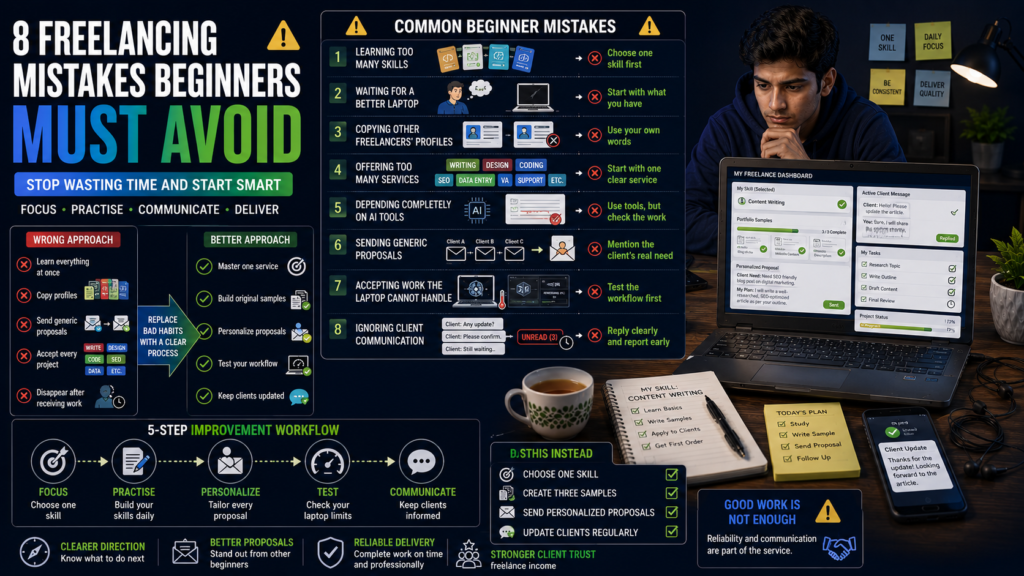
Learning without practising
Watching tutorials feels productive, but it can create false confidence.
After learning something, close the tutorial and complete the task yourself.
Waiting for the perfect laptop
A better laptop is useful, but it will not choose a skill, build your portfolio or contact clients for you.
Start with what your current machine can handle.
Offering too many services
Clients trust specialists more easily than beginners claiming to do everything.
Start narrow. Expand after gaining experience.
Copying other freelancers’ profiles
A copied profile makes you look interchangeable.
Use your own words and describe the exact work you can complete.
Depending completely on automatic tools
Grammar checkers, design templates and automation platforms can help, but they still produce mistakes.
Review everything before sending it to a client.
Ignoring communication skills
A freelancer can lose a client despite completing technically good work if they disappear for several days, miss instructions or respond rudely.
Communication is part of the service.
Accepting work your laptop cannot complete
Test the workflow before agreeing to a deadline.
A client will care about the final result, not the reason your laptop crashed.
Sources and Useful Resources
The technical recommendations in this guide were checked against official training platforms and current software documentation:
- DigiSkills Training Program
- Google Docs offline instructions
- LibreOffice system requirements
- Google Keyword Planner documentation
- Google Search Console Performance report
- WordPress hosting requirements
- Mailchimp pricing plans
- Adobe Premiere technical requirements
- Adobe After Effects system requirements
- Blender system requirements
- Unreal Engine hardware specifications
- PyTorch local installation guide
Final Thoughts
A low-end laptop is a limitation, but it is not the end of your freelancing plans.
The mistake is not owning a 4GB RAM laptop. The mistake is choosing work that requires hardware your laptop cannot provide.
Start with a lightweight service such as content writing, proofreading, SEO research, virtual assistance, WordPress management, lead generation or customer support.
Learn one skill properly. Create three convincing samples. Contact real potential clients. Deliver small projects carefully. Save part of your earnings and upgrade your setup when the work justifies it.
You do not need the perfect computer to take the first step.
You need a service you can complete, a client who needs it and the discipline to keep improving.
Continue building this skill
Find related lessons, practical guides and recommended learning resources.
View recommended coursesFrequently asked questions
Quick answers about this article and topic.
Can I start freelancing with a 4GB RAM laptop?
Yes. A 4GB RAM laptop can handle lightweight freelance work such as content writing, data entry, virtual assistance, lead generation, basic SEO, customer support and WordPress content management. You will need to limit multitasking and avoid opening too many browser tabs at once.
Which freelancing skill is best for a low-end laptop?
Content writing, virtual assistance, lead generation and WordPress management are some of the best options. They do not require powerful graphics hardware and can be learned using free or browser-based tools.
Can I freelance on an old Core i3 laptop?
Yes. An old Core i3 laptop can still be used for writing, research, spreadsheets, email support and basic website tasks. Its performance will depend on the processor generation, available RAM, storage type and overall condition.
Is 4GB RAM enough for Canva?
Canva can work on 4GB RAM for simple social-media posts, thumbnails, flyers and basic presentations. Large projects, animations, videos and multiple open designs may cause the browser to slow down.
Can I do video editing on a low-end laptop?
Basic trimming and simple low-resolution edits may be possible, but advanced video editing is not recommended on a 4GB RAM laptop. Effects, colour grading, high-resolution footage and long exports require stronger hardware.


Questions or comments?
Share your question, experience or useful idea below.